Halfhand: The Flight Recorder for Your AI Coding Agents

Your agent just finished a 40-minute run. It touched two dozen files, rewrote a config, deleted a module you didn’t expect it to touch, and reported “done.” Now you’re staring at a diff you didn’t watch happen, trying to reconstruct why — scrolling back through a terminal buffer that’s already scrolled off, or digging through a chat transcript that doesn’t quite line up with what actually landed on disk.
I hit this often enough running Claude Code, Codex CLI, and Gemini CLI back to back on the same repo that I built a tool to fix it. It’s called Halfhand, and it’s a local-first flight recorder for AI agents, written in Rust.
What Halfhand Actually Does
Halfhand ships as a single binary, hh. Point it at any agent command and it wraps that command in a PTY, recording terminal output and file changes as they happen — regardless of what you run. For agents it recognizes, it goes a level deeper and also captures the agent’s internal turns: prompts, tool calls, and tool results, as structured events.
hh run -- claude              # record a Claude Code session (or any command)
hh replay last                # faithfully play it back in an interactive TUI
hh inspect last                # non-interactive summary + step table
hh list                        # every recording, newest first
hh delete last --yes           # remove one
Everything — terminal bytes, file diffs, structured agent events — lands in a single local SQLite database plus a content-addressed blob store. There’s no server component, no account, no dashboard to log into. Recordings never leave your machine.
Recording a Session Looks Like This
Here’s hh inspect on a real Claude Code session — a step-by-step timeline of every file it touched, in order, with timestamps:
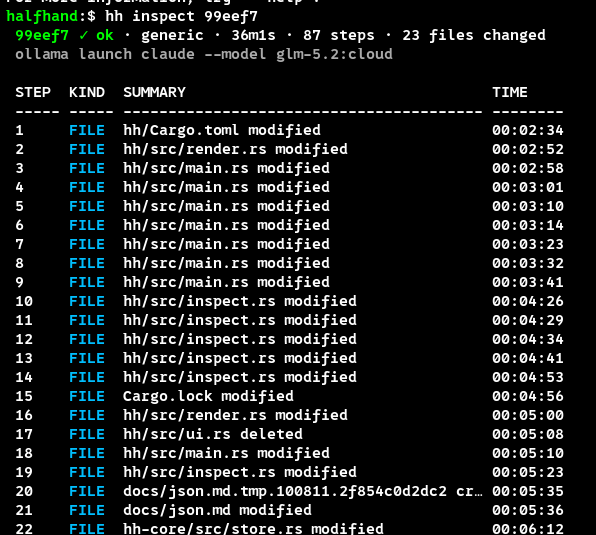
87 steps, 23 files changed, 36 minutes, one command. That table alone answers the question “what did it actually do” faster than re-reading the whole transcript.
Replaying It Faithfully
hh replay drops you into a keyboard-driven TUI: a timeline pane on the left, the detail for whatever step you’re on the right, and a keymap overlay (?) if you forget the bindings. j/k to move, J to jump to a timestamp, / to filter by kind or summary text, t to toggle terminal-output segments, d to jump straight to the next file diff.
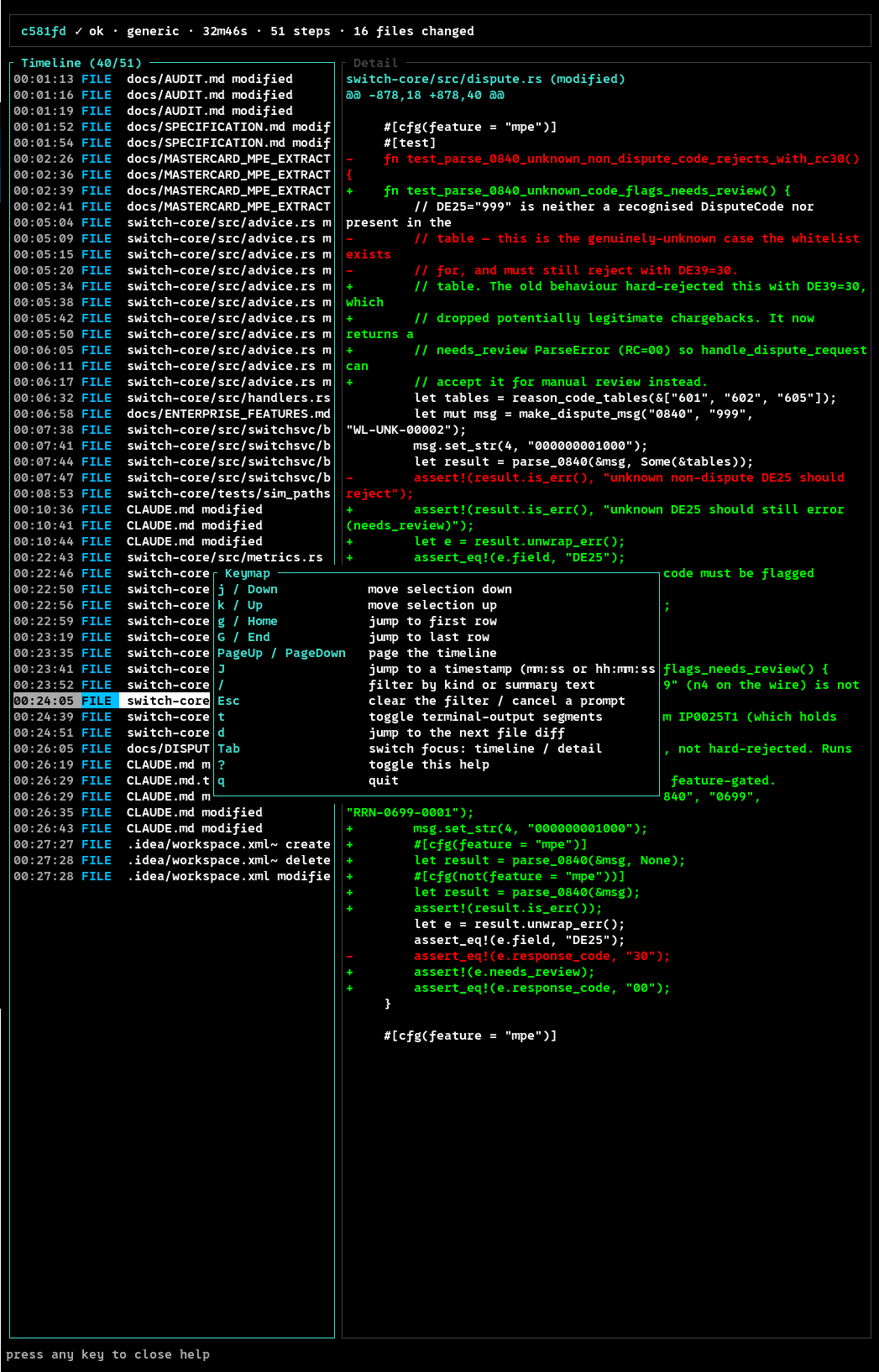
Worth being precise about what this is: hh replay is a faithful transcript, not deterministic re-execution. It renders the agent’s text, tool calls, and file diffs in the exact order they happened, but the agent is never re-invoked, no API calls are made, and no side effects are reproduced. A session that got cut short (hh killed mid-run) replays the partial timeline and is honestly marked interrupted rather than pretending otherwise.
Zooming Into a Single Step
For scripting or quick audits, hh inspect <id> --step N --diff skips the TUI entirely and prints the exact unified diff for that step:
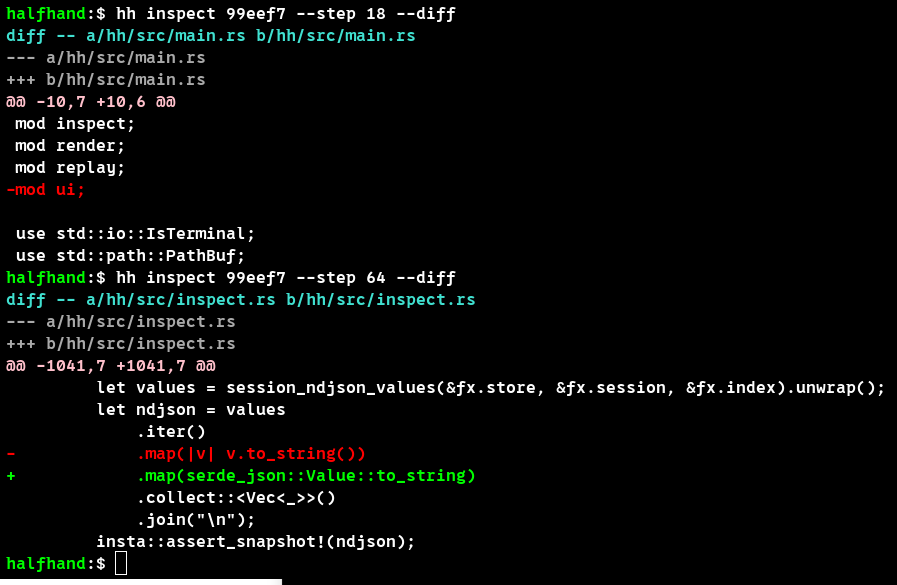
Add --json and the same data comes back structured, so you can pipe a session’s file changes into whatever review or CI tooling you already have. --failed filters down to steps where something went wrong — useful when an agent run silently regressed something and you don’t want to page through 80 steps to find where.
Installing It
Pick one, both install the hh binary:
# cargo, any OS with a Rust toolchain
cargo install halfhand

# shell installer (macOS & Linux), prebuilt binary + SHA-256 checksum
curl --proto '=https' --tlsv1.2 -LsSf https://github.com/halfhandorg/halfhand/releases/latest/download/halfhand-installer.sh | sh
hh --help gives you the full command surface — every subcommand also takes --help with its own usage example:
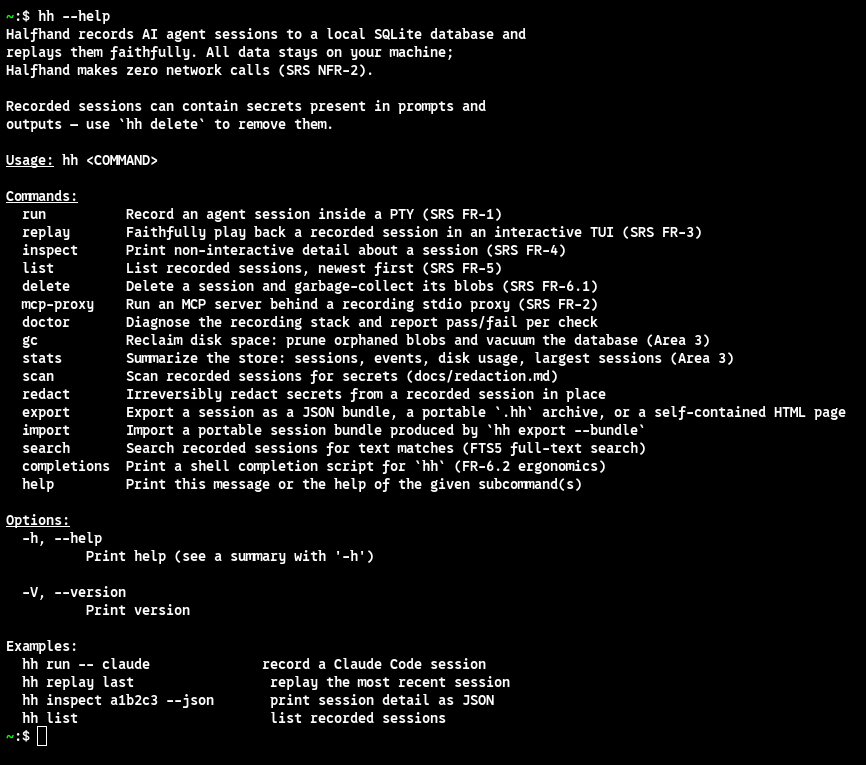
A few worth calling out beyond the obvious ones:
| Command | What it does |
|---|---|
hh search <query> |
Full-text search over recorded events (FTS5), filterable by --agent, --kind |
hh scan <id|last|--all> |
Reports secrets found in a recording — never the secret itself |
hh redact <id|last> |
Irreversibly strips detected secrets from a recording, in place |
hh export <id|last> |
JSON bundle, portable --bundle, or a self-contained --html page — redacted by default |
hh mcp-proxy -- <server> |
Wraps an MCP server in a recording stdio proxy, so you can see the MCP traffic too |
hh doctor / hh gc / hh stats |
Health check, disk reclaim, and store summary (sessions, disk usage, largest recordings) |
Adapters: More Than Just a Terminal Recording
Every hh run captures terminal output and file changes no matter what you point it at. On top of that, Halfhand auto-detects a handful of agents and records their internal turns as structured events instead of just raw bytes: Claude Code, Claude Desktop, OpenAI Codex CLI, and Google Gemini CLI — force a specific one with --adapter if detection guesses wrong. If it can’t find a transcript for whatever you’re running, it degrades gracefully: you still get the complete terminal and file-change recording, just without the structured breakdown.
Secrets Are a First-Class Concern, Not an Afterthought
Recorded sessions can contain secrets present in prompts and tool outputs — that’s just the reality of recording an agent that has your API keys in its environment. Halfhand treats this as a first-class problem instead of a footnote:
hh scanreports what it found, without ever printing the secret itselfhh redactremoves detected secrets from a recording in place, irreversiblyhh exportis redacted by default, whether you’re producing a JSON bundle, a portable.hharchive, or a self-contained HTML replay page
You can also turn on redaction at record time, before anything touches disk:
[redaction]
at_record = true   # default: false — scrub secrets before they hit disk
entropy = true     # default: true — conservative high-entropy detector
rules = [
  { name = "anthropic-api-key", pattern = "sk-ant-[a-zA-Z0-9\\-_]{32,}" },
  { name = "openai-api-key",    pattern = "sk-(?:proj|svcacct|[A-Za-z0-9]{2})-[A-Za-z0-9]{32,}" },
  { name = "stripe-secret-key", pattern = "sk_(?:live|test)_[a-zA-Z0-9]{24,}" },
]
Built-in detectors already cover AWS, GitHub, GitLab, Slack, PEM keys, and JWTs — the rules block just fills gaps for anything Halfhand doesn’t know about yet. A malformed rule is a hard error at startup, on purpose: silently dropping a detector would be a redaction hole, not a convenience.
Why Local-First
This is the part I care about most, and it’s not a marketing line — it’s enforced:
- Zero network calls. The
hhbinary links no HTTP client. A CI check fails the build if that ever changes. - You own the data. One SQLite file plus a content-addressed blob store, in a data directory you control (
HH_DATA_DIR).hh deleteand it’s actually gone. - Stable interface. The
--jsonschema is frozen going into 1.0, CLI flags are additive-only, and database migrations only ever run forward.
No account, no telemetry, no “anonymous usage stats.” If you’re recording agent sessions that touch client code, production configs, or anything under an NDA, that constraint isn’t a nice-to-have.
What Developers Are Saying
“This is super cool! It’s like a VCR for LLMs.”
— Kenneth Reitz, creator of Requests, Certifi, Pipenv & more
Try It
cargo install halfhand
hh run -- claude
hh replay last
Halfhand is Apache-2.0 licensed and open to contributions — read CONTRIBUTING.md before opening a PR. Source, docs, and the full command reference live at github.com/halfhandorg/halfhand; the project site is halfhand.org.
I built this because I kept losing track of what my own agents were doing to my own repos. If you run Claude Code, Codex, or Gemini CLI against anything you’d want to audit later, it might save you the same headache it saved me.
